Odoo builds AI into every app through the Odoo AI app, included in Odoo Enterprise since Odoo 19. AI fields fill in and classify data, AI agents answer questions and act on records, and content tools draft text. Odoo 20 adds agents in automations, voice input, record creation and a native MCP server; all AI use consumes credits.
Odoo has taken a gradual, practical approach: AI features arrived app by app from Odoo 17, and since Odoo 19 they are consolidated in a dedicated AI app.
Odoo 19 (September 2025) launched the standalone AI app with AI agents and AI fields; Odoo 20 (September 2026) made the agents autonomous and opened the database to external assistants through a native MCP server.
This guide covers what Odoo AI does in each app in Odoo 20, what’s new compared with Odoo 19, which edition you need, and how it fits into your workflows.
Table of contents
Which AI features does each Odoo app have?
CRM: how does AI help with leads?
Sales: how does AI help write follow-ups?
Helpdesk: how does AI answer tickets?
HR: how does AI support recruiting?
Accounting: which finance tasks does AI automate?
Marketing: how does AI write campaigns?
Website and eCommerce: what does AI generate?
Documents: how does AI summarise and sort files?
Which AI features does each Odoo app have?
Odoo integrates AI where it can cut repetitive tasks, help with writing, and reduce delays in decision-making. “AI in an ERP pays off because the model sits next to the data and the access rights, not because of the chat window. We advise clients to start with one narrow process, measure the credits it consumes, then widen the scope,” says Simon Stappen, Managing Partner at much. Consulting.
You’ll find these tools in form views, sidebars and editors. They need an Odoo Enterprise database (Odoo 19 or 20); you pick an AI provider once, and in Odoo 20 every AI request consumes credits bought through in-app purchases (IAP), according to the Odoo 20 release notes.
The features use a mix of generative AI for writing and suggesting content, predictive AI for scoring and prioritisation, and contextual triggers for guiding workflows. Since Odoo 19, AI fields (set up in Studio) fill or classify a field automatically from a prompt, and AI agents work in chats, composers and automated actions.
Odoo 20 goes further: agents run inside automation rules and scheduled actions, create and update records from typed, spoken or PDF instructions, and a native MCP server connects external assistants such as Claude or ChatGPT to your database (Odoo documentation 20.0, AI section).
CRM: how does AI help with leads?
Sales teams can now get support with AI in Odoo, especially in early-stage lead handling.
Email suggestions adapt to the tone and context of each deal. Lead scoring uses past wins to predict which prospects are worth pursuing. And the system fills in missing company details the moment a domain is added.
Duplicates are flagged automatically, cutting down on manual cleanup. Combined, these features reduce the steps needed to qualify and respond without changing your sales flow. In Odoo 20, an AI agent can also run inside an automation rule, for example to qualify a lead or draft the follow-up when it reaches a stage.
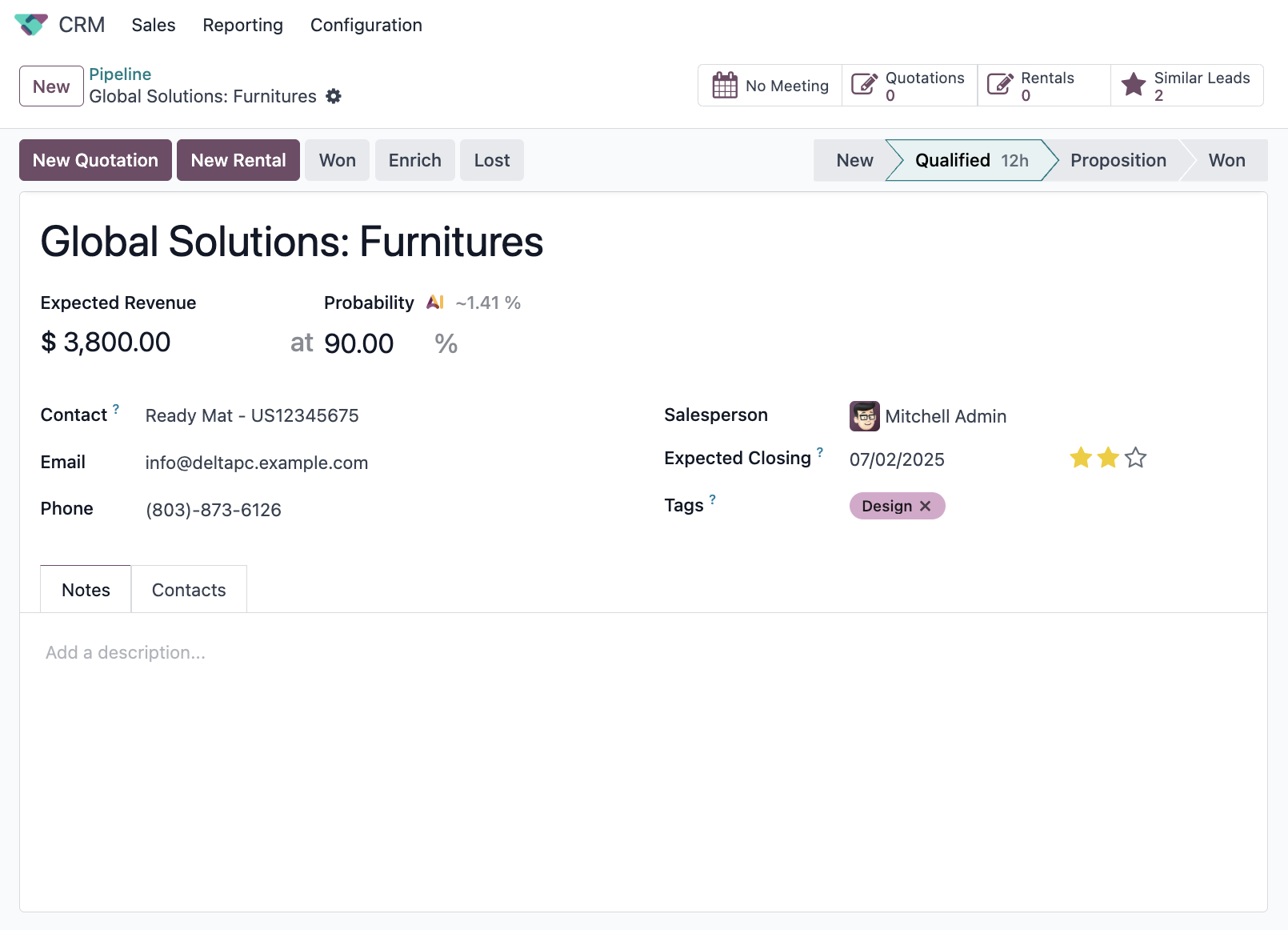
Predictive lead scoring using Odoo AI
Sales: how does AI help write follow-ups?
AI writing tools support sales teams when following up with prospects and preparing deal communication.
You can rewrite emails with one click, adjusting tone, length or clarity based on the deal context.
Suggestions are available directly in the message editor and help make outreach faster and more tailored without switching tools or leaving Odoo.
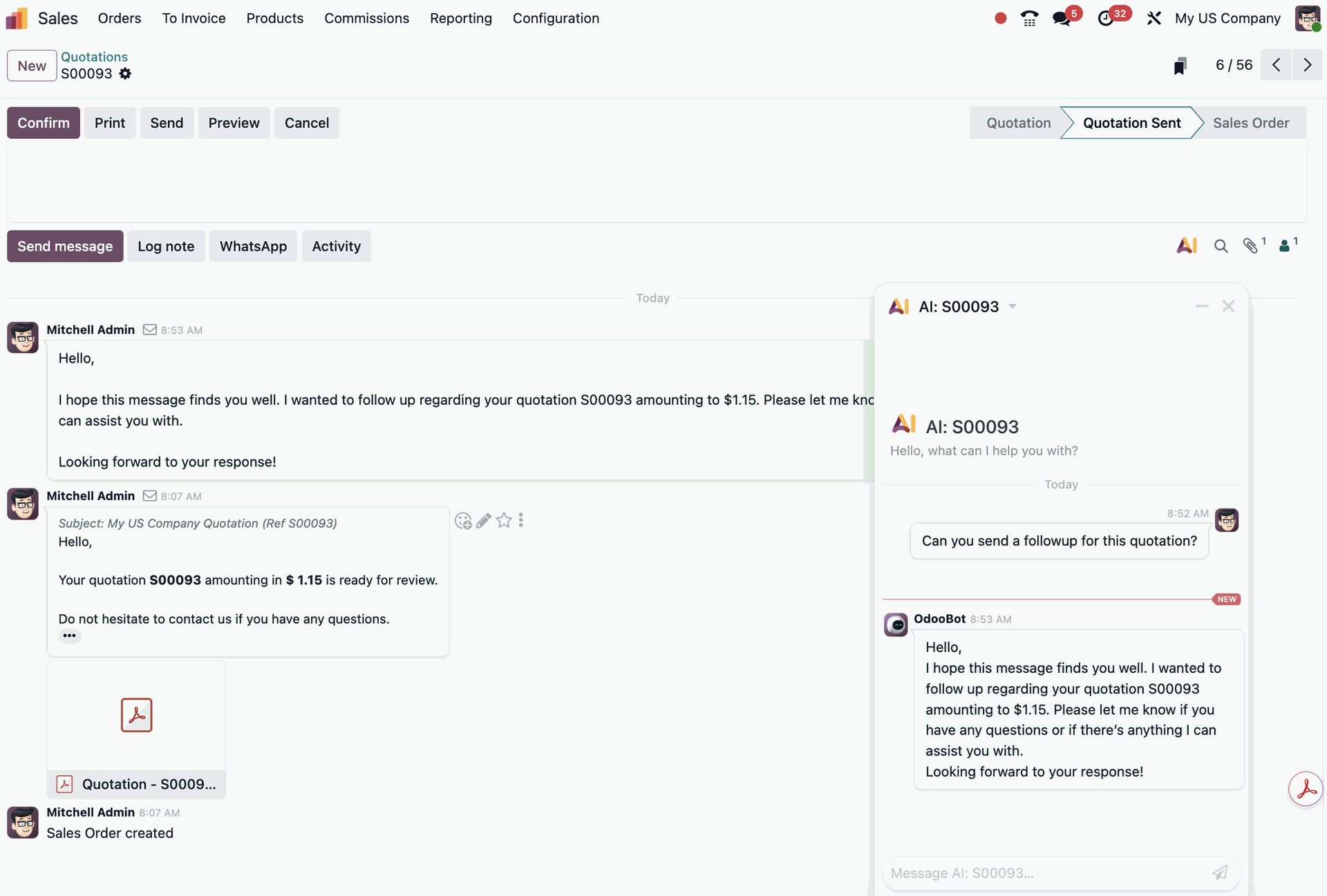
AI-powered email writing, including details from the associated Sales Order
Helpdesk: how does AI answer tickets?
Helpdesk agents can now draft full replies with AI, rewrite them to fit the tone, or summarise ticket history in one click.
In Odoo 20, AI detects similar past tickets and suggests answers based on how they were solved. If a ticket shows signs of urgency based on volume, wording or tags, the system highlights it early.
Although these tools are subtly integrated in the interface, they directly help to reduce first response time from agents while maintaining reply quality.
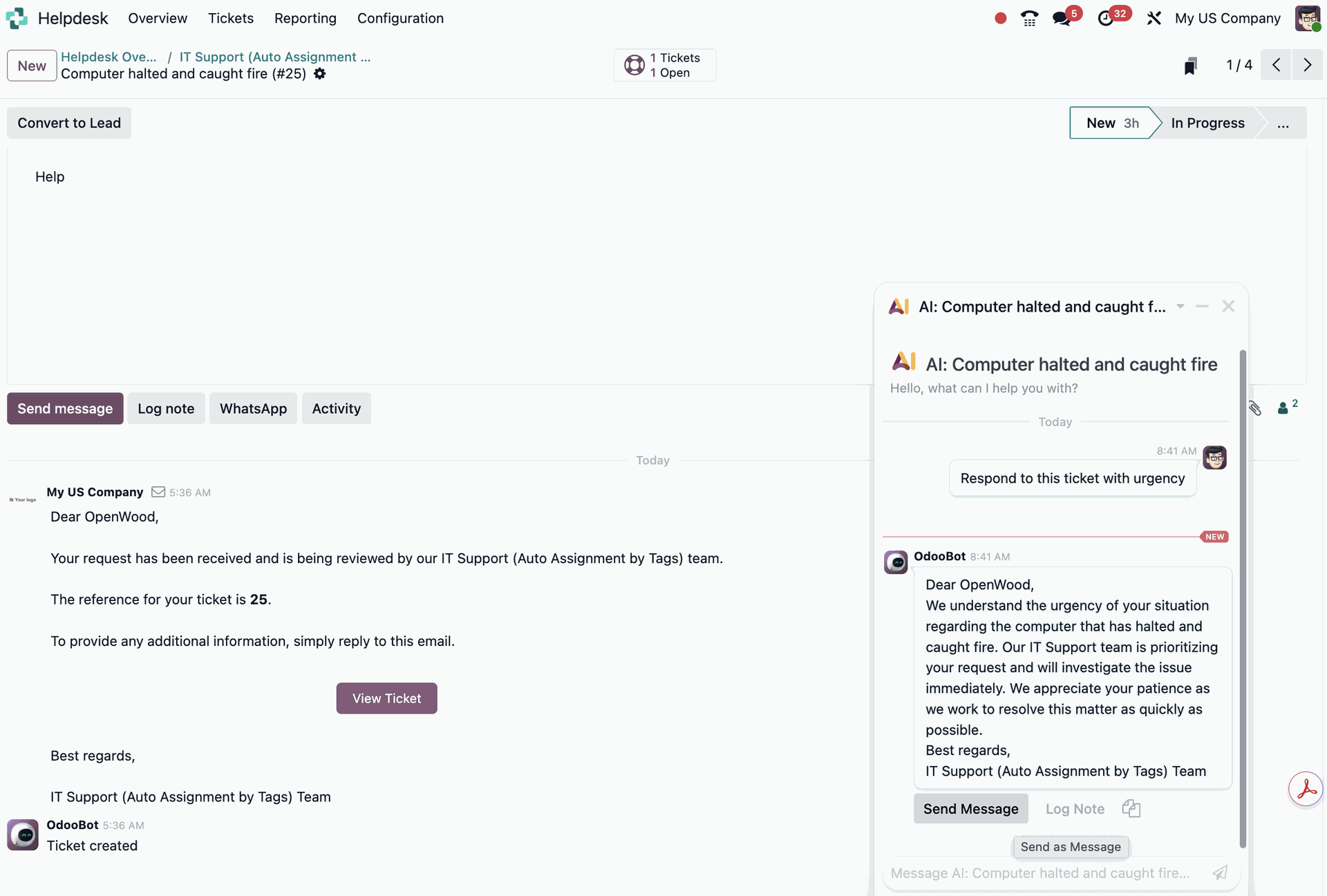
Ticket response written by Odoo AI, based on existing chat logs and urgency level
HR: how does AI support recruiting?
Recruiters benefit from AI-backed CV parsing, candidate scoring, and scheduling tools that reduce back-and-forth.
Resumes are parsed into structured fields automatically. The system ranks candidates by comparing past hires and job descriptions. Suggested time slots simplify coordination between interviewers.
Offer letters can be generated and edited directly in the interface, cutting prep time without cutting quality.
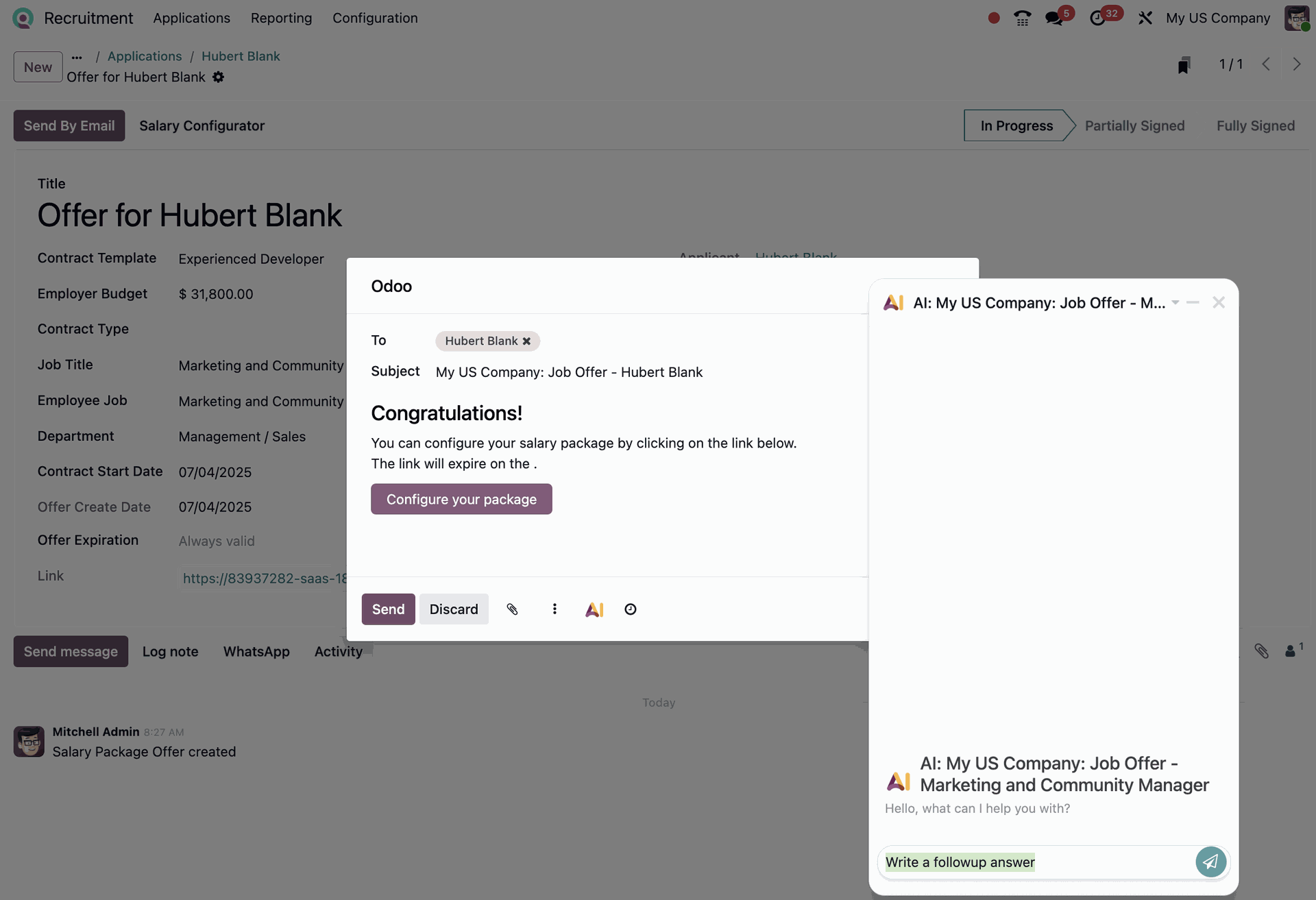
Offer email generated by Odoo AI tools
Accounting: which finance tasks does AI automate?
AI now handles some of the most repetitive finance tasks like invoice reading, reconciliation, and expense categorisation.
OCR extracts values and vendor data from email attachments. Bank statement lines are matched with ledger entries automatically. Expense accounts are predicted based on past classifications and confirmations. Odoo 20 pre-fills vendor bill lines (product, account, tax, analytic distribution) from past bills, and an AI accounting agent answers questions about your finances from the accounting data in your database.
The system improves over time and even flags anomalies when data doesn’t match expected patterns.
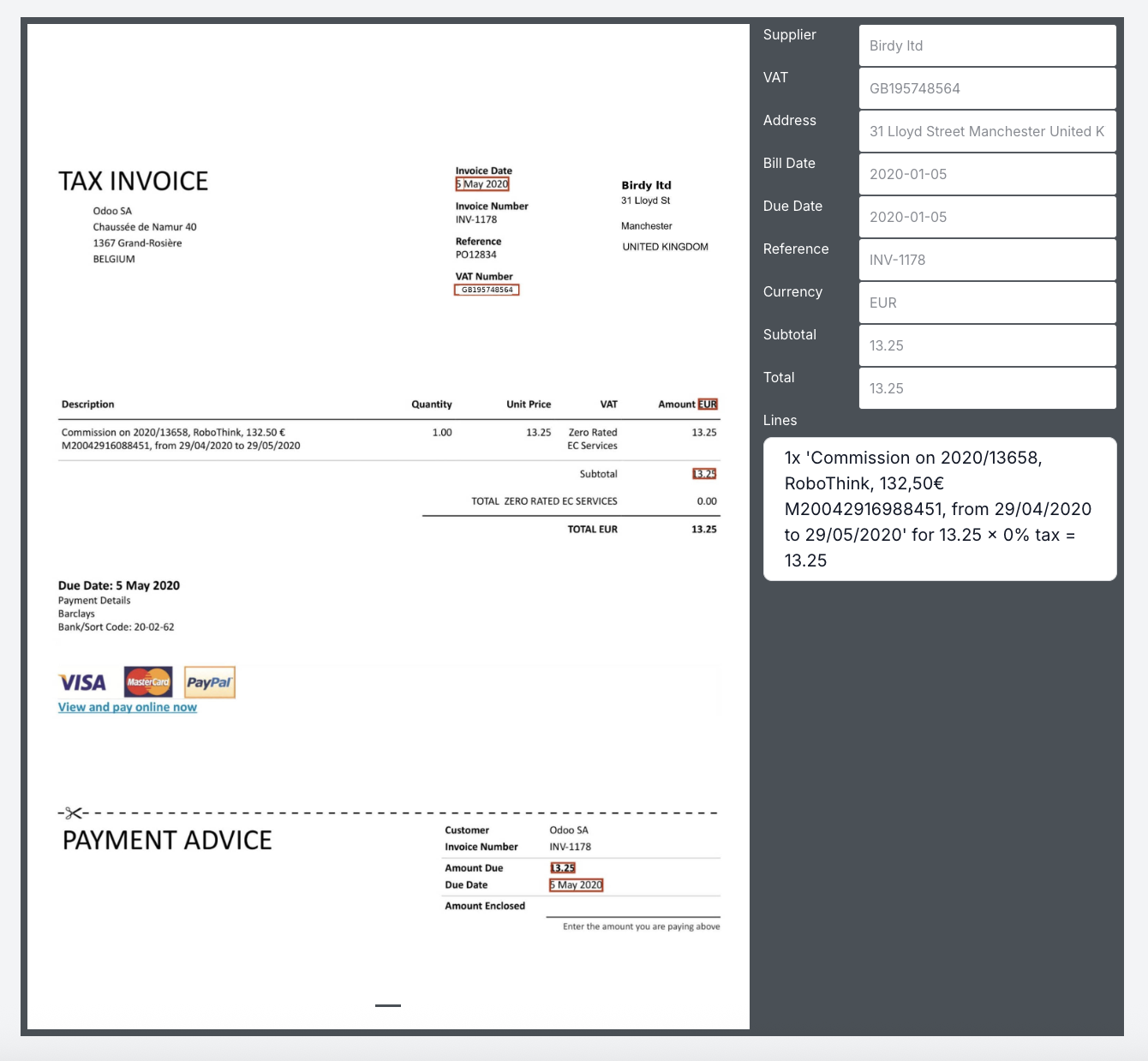
Odoo AI uses OCR to extract information for tax invoices
Marketing: how does AI write campaigns?
Odoo’s campaign editors let you generate email and SMS copy using AI. You can rewrite content to match your tone, shorten long sections, or regenerate headlines until they fit.
Campaign logic adapts to the segment and product line. AI tools can also suggest subject lines and CTAs designed to improve campaign performance.
In Odoo 20, AI also helps set up Marketing Automation campaigns in the new visual workflow builder and writes social media posts.
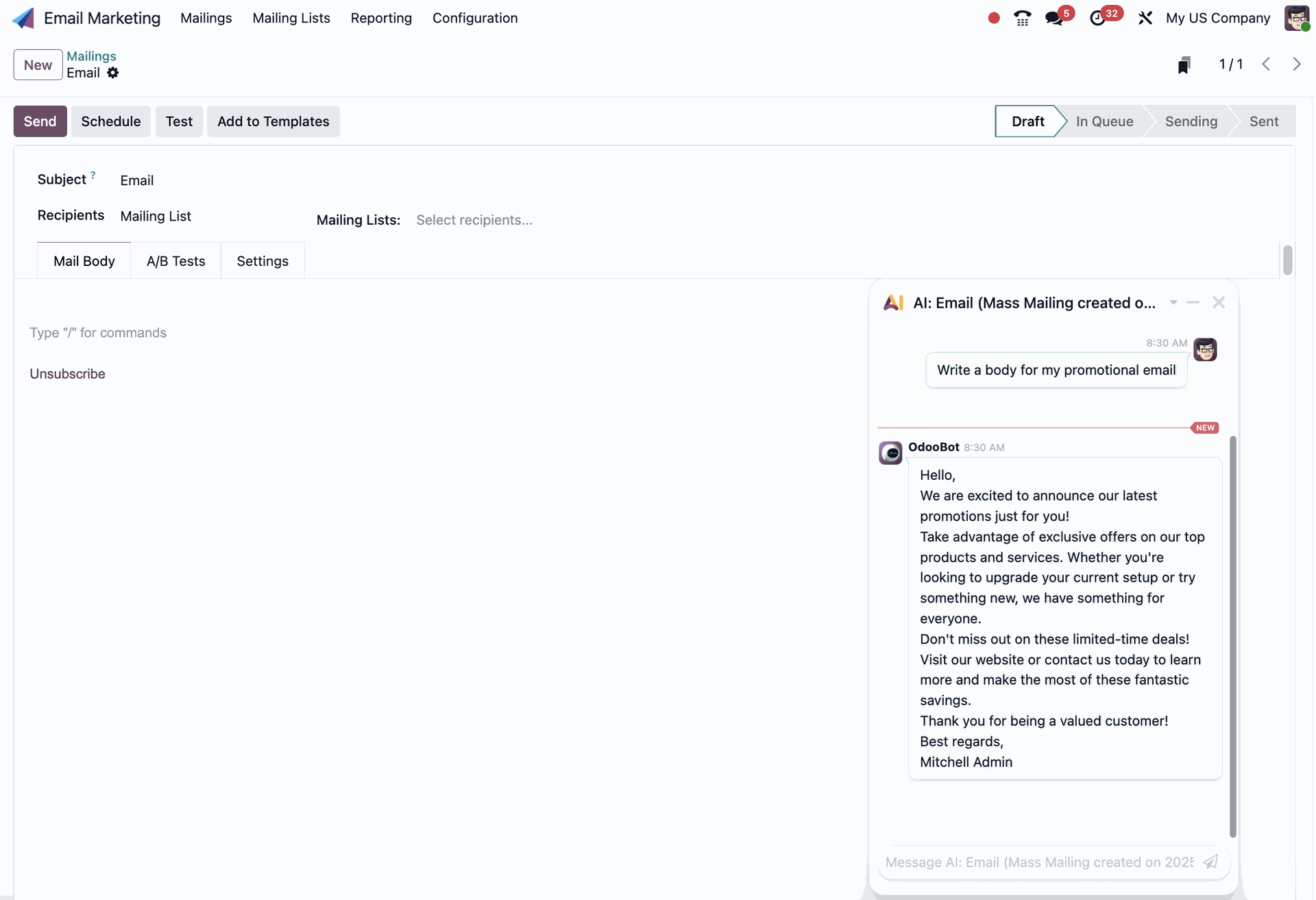
Odoo Email Marketing copy can be generated with AI
Website and eCommerce: what does AI generate?
Web editors and product managers now get help from AI directly in the content fields.
You can write product descriptions using a mix of name, category, and features and refine them instantly. You can also generate blog posts and write landing page sections using AI, tools that became available starting in Odoo 18.
You can also generate product or page images using AI, and get SEO titles and meta descriptions proposed automatically in views where AI is supported. In Odoo 20, the AI Website Assistant creates new pages, edits forms and menus and replicates an existing page from a URL, while the shop assistant generates product images and edits names, prices and descriptions.
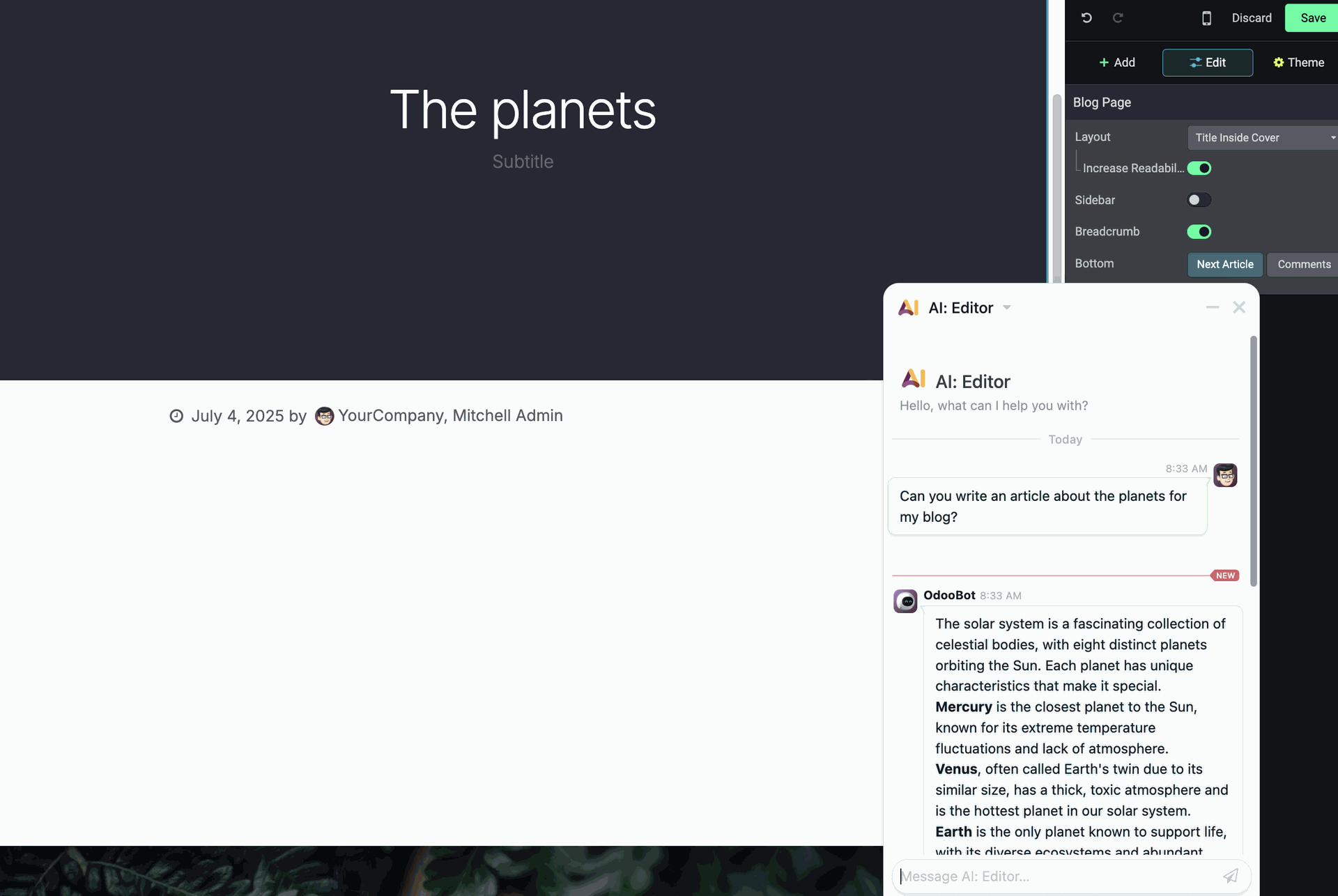
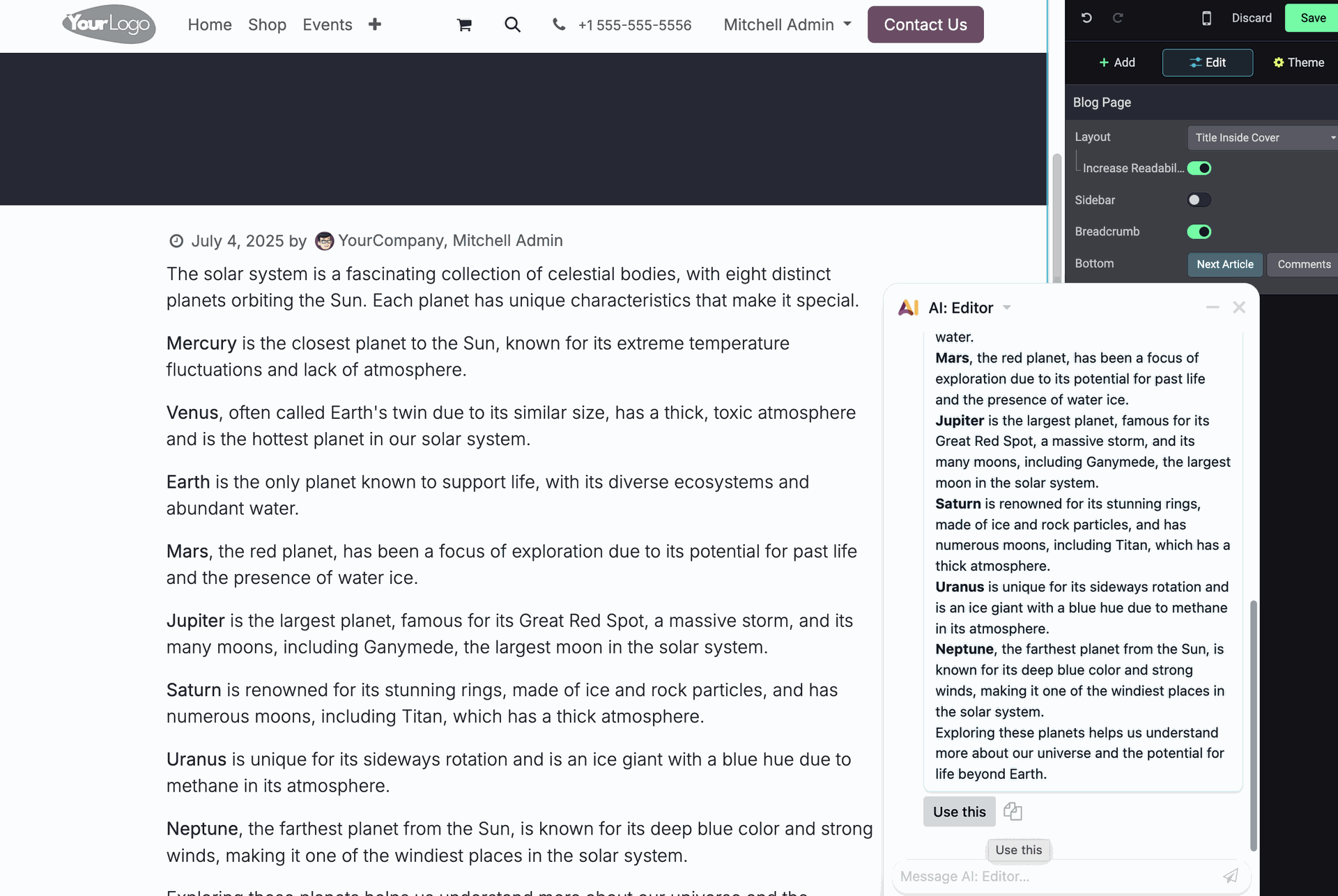
Blog posts can be generated or edited with the Odoo AI tool
Documents: how does AI summarise and sort files?
Since Odoo 19, internal documents can be summarised or rewritten with AI tools built into the editor, and AI agents answer questions from files in Documents and from Knowledge articles.
Meeting notes, handovers and project plans are condensed without losing key points, and meetings or dictations can be transcribed in real time. Clarity and tone suggestions help improve communication without slowing down.
In Odoo 20, AI renames files in the Documents app automatically, and documents can be sorted and actions triggered based on prompts
Operations: how does AI forecast demand?
Inventory, procurement, and manufacturing apps now include early-stage forecasting tools.
AI analyses demand patterns to propose restocking or purchase decisions. In MRP, it flags potential delays based on work order flow and dependencies.
These tools are still evolving, but they already help planners catch issues before they escalate. In Odoo 20, Odoo also suggests minimum and maximum stock levels for reordering rules based on demand history, desired days of coverage and order frequency.
How does Odoo deliver built-in AI with minimal setup?
Odoo AI uses ChatGPT (OpenAI) or Gemini (Google) as the provider. You choose one when you set up an agent, and in Odoo 20 Odoo picks the best model from that provider for each task. No API key is needed, but every request consumes AI credits bought through in-app purchases.
Prompts are configurable since Odoo 19: you write a system prompt, set a response style and choose the sources an agent may answer from. The native MCP server, however, isn’t allowed to write by default: it ships read-only and stays so until an administrator enables write actions; for Odoo 16 to 19, the open-source Odoo MCP Server by much. offers the same connection with approval and logging. Data may be processed externally, depending on the hosting and model used. “Most of the AI-in-ERP requests we see are not about writing better emails. They are about getting a reliable answer from live business data, which is where in-app agents and the MCP server now compete with external tools,” says Simon Stappen, Managing Partner at much. Consulting.
For most users, AI just appears as a sentence suggestion, a pre-filled field, or a quick “rewrite” option. It doesn’t feel like a big change but the improvement in everyday work is easy to notice.
Odoo AI FAQs
Which Odoo apps have AI features?
Almost all of them. Since Odoo 19, the Odoo AI app adds agents, AI fields and writing tools across CRM, Sales, Helpdesk, Recruitment, Accounting, Marketing, Website, eCommerce, Documents, Inventory and Manufacturing. Each app also keeps its own specific features, such as lead scoring in CRM or bill line prediction in Accounting.
Do I need Odoo Enterprise for Odoo AI?
Yes. The Odoo AI app and the native MCP server are Enterprise modules, so Odoo Community has neither. You need an Odoo 19 or Odoo 20 Enterprise database, and in Odoo 20 every AI request also consumes credits bought through in-app purchases (IAP), so plan for usage costs on top of the licence. Read our Meet Odoo AI post.
What did Odoo 20 add to Odoo AI compared with Odoo 19?
Autonomy. In Odoo 19, agents answered questions and drafted content. In Odoo 20 they run on their own inside automation rules or at scheduled times, create and update records from instructions, and Odoo picks the best model for each task. Odoo 20 also adds a native MCP server and an AI accounting agent. See what Odoo 20 AI brings.
What are AI fields in Odoo?
AI fields are record fields that Odoo fills or classifies automatically from a prompt you define, for example tagging a helpdesk ticket by topic or extracting a value from a free-text description. They are set up in Studio, arrived with the AI app in Odoo 19 and are described in the AI section of the Odoo 20.0 documentation.
Which AI models does Odoo AI use?
ChatGPT (OpenAI) or Gemini (Google). You choose the provider when you set up an agent; in Odoo 20, Odoo then selects the best model from that provider for each task. No API key is needed, and usage is billed in AI credits bought through in-app purchases.
What is the Odoo MCP server and do I need it?
A bridge for external assistants. The native MCP server in Odoo 20 lets tools such as Claude or ChatGPT read your Odoo data under each user's access rights, read-only until an administrator enables write actions. You need it only if your team works from an external assistant; for Odoo 16 to 19, much. offers an open-source alternative. Learn more.
Where does Odoo AI still fall short?
Mainly in multi-module requests. In our hands-on tests, Odoo AI answers well on one topic or module at a time, summarises records, drafts emails and turns questions into pivot or graph views. A single view that combines margins, stock levels and payment status is not yet reliable, and call transcripts do not fill fields automatically. Read our hands-on review.
Ready to see what Odoo AI can do? Reach out now
Odoo AI is fully integrated across key apps and ready to automate your processes.
If you're already on Odoo 20, still on Odoo 19 or planning your Odoo implementation, our consultants can show you what’s possible.
Contact us to understand more about Odoo AI features and how to make them work for you.
